

As a business owner, dealing with accounting software, managing vendor relationships, and processing payments might take up more of your time than is necessary. You can frequently find yourself switching between systems to upload money to your accounting software or pay bills. The time you spend on administrative tasks adds up and keeps you from doing what’s crucial: expanding your company.
To help you simply pay invoices without leaving your Shopify admin, we created Shopify Bill Pay powered by Melio, a fully integrated company payments service.
Table of Content
- Shopify Bill Pay: What is it?
- What are the features of shopify bill pay
- What benefits does Shopify Bill Pay offer?
- How to use Shopify Bill Pay
- Tips for boosting Shopify Bill Pay
- Conclusion
Shopify Bill Pay: What is it?
An software for company payments called Shopify Bill Pay makes it simple to monitor, schedule, and pay your invoices.
You can manage all of your suppliers, contractors, and vendors in one location with Shopify Bill Pay. No matter how you want to pay, you may let the sellers choose whether they want to be paid via cheque or bank transfer.
You can now manage your financial flow and save time paying your company’s expenses using Shopify. The best thing, though? There aren’t any signup or subscription fees.

What are the features of shopify bill pay
The debut of Shopify Bill Pay, a new service that makes it simple for retailers to pay their business costs, is something that Shopify is thrilled to announce. Melio, a well-known B2B payments platform, powers Shopify Bill Pay, which has a number of features that make it a useful tool for retailers. These features include:
- Anywhere, pay any business: You may pay bills from any merchant using Shopify Bill Pay, regardless of where they are located.
- Your way to pay: You have several payment options, including wire transfers, credit cards, ACH bank transfers, and your Shopify Balance account.
- Give vendors the option of how they want to be paid: You can decide whether to pay your merchants via bank transfer or cheque.
- Save time and money: Shopify Bill Pay automates bill payment, allowing you to save time and stay clear of late fees.
- Stay on top of your finances: Shopify Bill Pay integrates with Shopify Balance and QuickBooks Online, so you can easily track your expenses and cash flow.
When paying company bills, retailers may make significant time, cost, and bother savings by using Shopify Bill Pay. Visit the Shopify website to find out more and register for Bill Pay with Shopify.
What benefits does Shopify Bill Pay offer?
Everyone pays and is compensated in their own manner
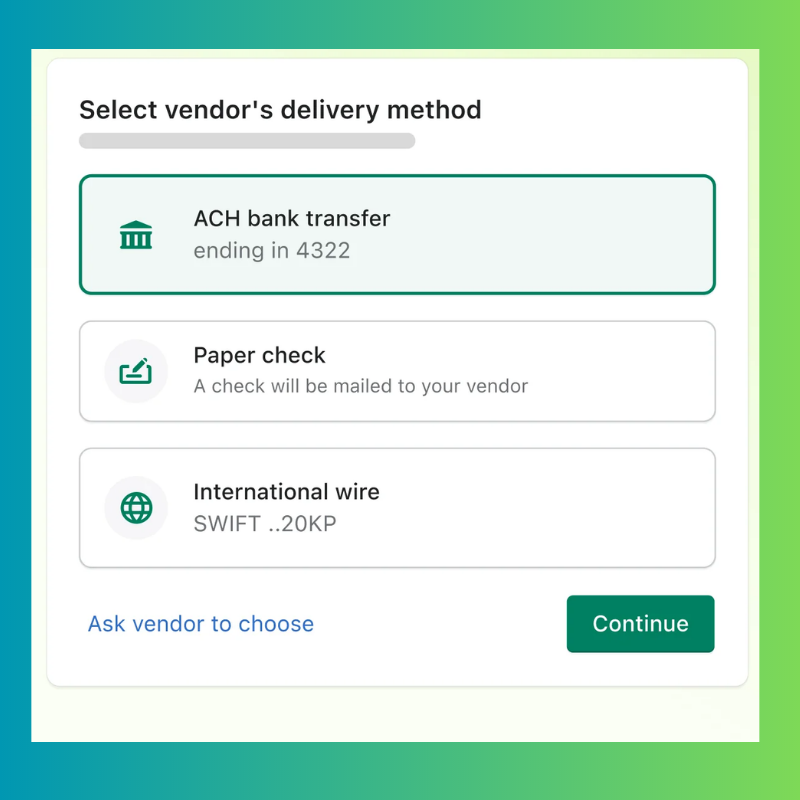
It’s acceptable if your vendor just takes checks. You can pay using Shopify Bill Pay using your Shopify Balance, a credit or debit card, or an ACH bank transfer, and you can pay suppliers using an ACH bank transfer, paper checks, or wire transfers from abroad. This adaptability improves relationships with vendors while ensuring that everyone’s demands are addressed.
Paying suppliers worldwide
Working with the greatest industry vendors and suppliers shouldn’t be limited by geography. You can easily pay merchants anywhere in the world using Shopify Bill Pay. This enables you to handle everything from one location and establish relationships with vendors outside of the US.
Keep track of your bills
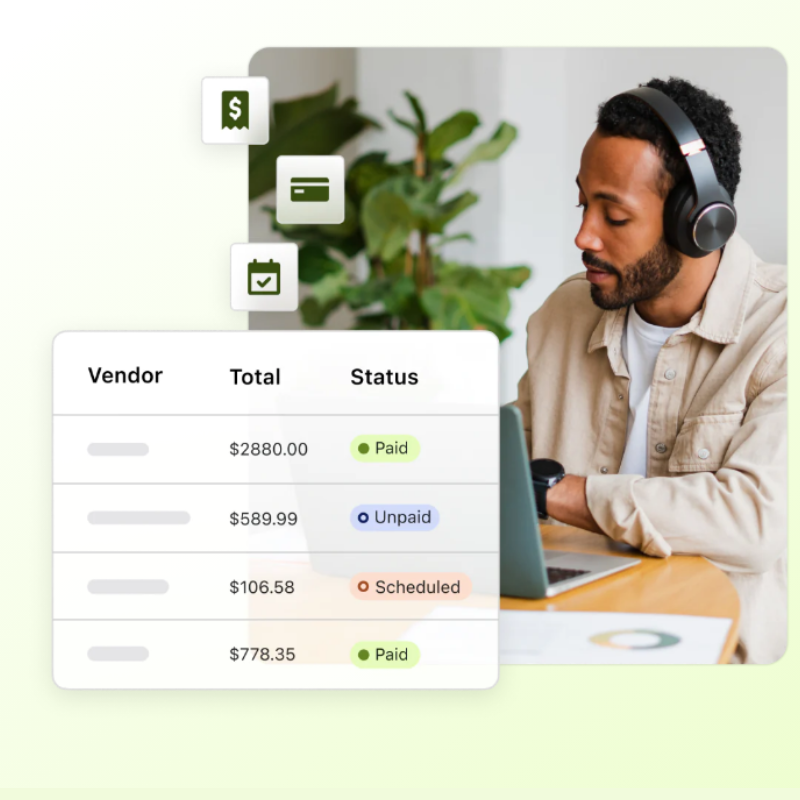
Missed deadlines and late fees might occur from misplacing or losing track of your bills. You and your vendors can send invoices to your designated email account to make sure you maintain track of all your bills.
Invoices for your review will automatically be added to your Pay Inbox via Shopify Bill Pay. All of your invoices are collected in one location, are organised, and are available for scheduling payment.
How to use Shopify Bill Pay
You may quickly and simply pay your bills online using Shopify Bill Pay. The steps for using it are as follows:
- Set up Bill Pay on Shopify. To pay a bill, select Finances > Bill Pay from your Shopify admin. Click Manage Bill Pay under More actions. Click Add payment method under Your payment methods. Choose the payment option you want to use, such as a bank account, credit card, or debit card. To add your payment method, simply follow the instructions.
- Add bills to shopify bill pay. You can manually add bills to Shopify Bill Pay or have them automatically imported from QuickBooks or your email.
- Go to Finances > Bill Pay and click Add bill to manually add a bill. Enter the bill’s information, including the vendor’s name, the invoice number, and the balance owed. Adding a bill copy is also possible.
- Go to Finances > Bill Pay and select Settings to have bills loaded automatically from your email. Enter the email address you want your vendors to use to send you bills under the Bills section.
- Go to Finances > Bill Pay and select Settings to have bills from QuickBooks loaded automatically. Click Connect to QuickBooks in the Bills area, then follow the on-screen directions.
- Pay your debts. When you’re prepared to pay a bill, navigate to Finances > Bill Pay and select the appropriate bill. Choose your preferred payment option by clicking Pay now.
Tips for boosting Shopify Bill Pay
Here are some tips for boosting shopify bill pay
1. Use a credit card to purchase things and get cash back.
Even when credit is not a supported payment method, you can still pay all of your bills by card and earn rewards and cashback by doing so with Shopify Bill Pay. Paying with a credit or debit card can earn you points while also being secure, allowing you more control over your financial flow, and possibly processing payments more quickly than other payment options.
2. To ensure that you never miss a payment, use payment scheduling
Shopify In order to make payments as close to the due date as feasible, bill pay enables you to plan when payments are sent out. By doing this, you can ensure that your vendors are paid on time while avoiding cash flow problems from early payments or paying late fees. In addition to preserving solid vendor relationships, this might lead to future contracts with better terms.
3. To ensure smooth workflow and reconciliation, sync to QuickBooks® Online.
Try integrating Shopify Bill Pay with your QuickBooks® Online account to keep your accounts current and minimise manual administrative work.
Vendor information and all of your Shopify Bill Pay outstanding, scheduled, and paid bills will be visible in your QuickBooks Online® account. This results in significant time savings and a decrease in errors brought on by human entry.
4. Use Shopify Balance to pay bills to save transaction fees.
Trying to reduce transaction costs? To pay any business from the Shopify admin, try using Shopify Balance.
Any business expense, including rent, utilities, contracted work, purchase orders, and more, may be paid with Shopify Balance. Additionally, you can still use checks or ACH bank transfers to pay your vendors.
Conclusion
Shopify Bill Pay stands out as a game-changer in the world of financial transactions, where ease, flexibility, and security are essential. It accommodates individual preferences while also streamlining company transactions because to its broad range of accepted payment options. The digitalization of trade and finance has advanced with this breakthrough, taking us one step closer to a streamlined and user-focused financial environment.
Shopify Bill Pay is a leader in the field of payments as we embrace the principles of contemporary finance. As more companies and consumers use this ground-breaking platform, its effects will definitely be seen throughout industries. The future of financial transactions is now, so whether you’re a business owner trying to improve your payment procedures or a consumer seeking ease, keep an eye out for Shopify Bill Pay.
Join us as you begin your Shopify journey
We are e-commerce specialists and Shopify Partners. Get in touch with us if you need assistance with Shopify, need a whole website built, or have any other general questions.